Introducing CKEditor 5
CKEditor 5 is Drupal’s new rich-text editor, replacing CKEditor 4 with a cleaner and more modern interface for creating, formatting, and managing website content.
This page highlights selected CKEditor 5 interface changes to help content editors become familiar with the new editing experience. Screenshots and practical instructions are provided for the Link and Button tools.
CKEditor 5 Interface Guide
The Button Tool
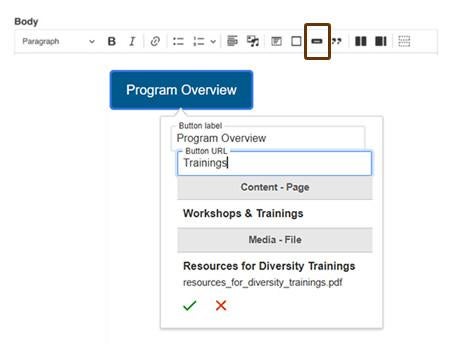
This new tool keeps the label within the button area, helping prevent text from overlapping or extending beyond its boundaries.
Position your cursor where you want the button to appear, then select the Button icon. Enter the button label and URL. Search for an internal page or media file by entering keywords, or enter a complete external URL. Select the correct result, then select the check mark to add the linked button.
The Link Tool
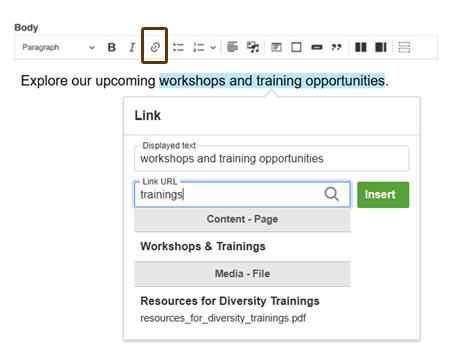
Use this tool to add or edit hyperlinks in the editor. The screenshot on the right shows how to link the example text Workshops & Training Opportunities. Select the words you want to link, then choose the Link button.
Search for an internal page or media file by entering keywords, or enter a complete external URL. Select the correct result, then select Insert.
To make changes later, select the hyperlink and select the pencil icon.